
Guard Management System for Security Companies
Manage your guards, attendance, patrol activity and incident reports in one system. Safeport offers other security firms access to its Guard Management System to support their own teams, client sites and daily operations.
You keep your own guards and clients. You do not need to hire Safeport guards to use the system.
Built for teams that run guards every day
If your company coordinates guards through phone calls, WhatsApp groups, spreadsheets or paper logbooks, the system brings attendance, patrols and reports into one dependable record.
How work moves through the system
- 1
Managers set up the operation
Add your guards with their own login codes, your client sites with their location boundaries, and the patrol checkpoints for each site. Print the checkpoint QR codes and post them on site.
- 2
Guards record their shift
Guards use the app on their phones to clock in at the site, scan checkpoints on patrol, file incident and condition reports, and log visitors and contractors.
- 3
Supervisors review the record
Each shift produces a daily activity report with a written summary and a compliance score. Supervisors can see missed checkpoints, open incidents and reports in one place.
- 4
You prove the work was done
Every clock-in, scan and report is time-stamped and kept, giving you a dependable record to answer client questions and support your own audits.
Capabilities and what they give you
Guard roster and sites
Keep your guards, sites and checkpoints in one place. Give each guard a personal login code and PIN, and import existing lists from a spreadsheet.
Time and attendance
Guards clock in and out from their phones. Clock-in is accepted only when the phone is within the site’s boundary, hours are calculated automatically, and rejected attempts are recorded for review.
Patrol checkpoints
Guards scan a QR code at each checkpoint, which records the time and their location. Set patrol schedules to see which checkpoints were visited and which were missed. Location is recorded at clock-in and at each scan — it is not tracked continuously.
Incident and site reporting
Guards file incident reports from their phones with the type, severity, details and action taken, submit site condition reports, and keep a visitor and contractor log.
Shift handover
When a guard starts a shift, they are briefed on open incidents, people still on site and outstanding follow-ups from the previous shift, and confirm they have understood before continuing.
Daily reports and performance
A daily activity report is generated for every completed shift, with a written summary, patrol completion and a compliance score. Managers can track each guard’s scores over time.
What managers and guards actually see
Real screens from the Guard Management System, shown with a fictional sample company. All names, sites and figures are sample data.
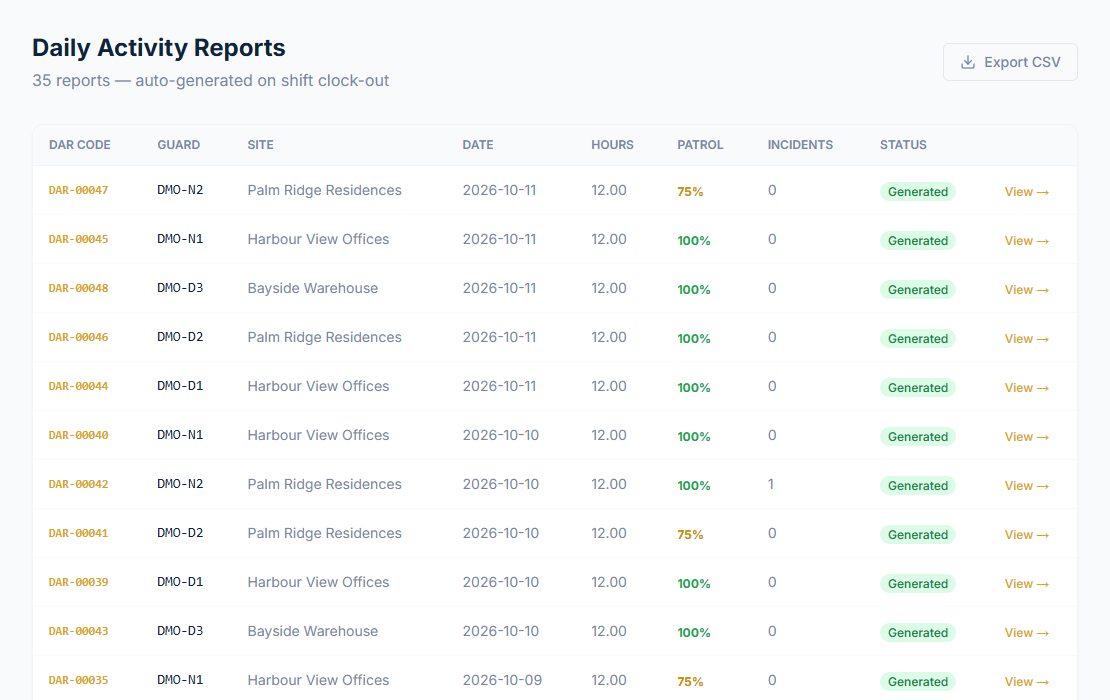
Daily reports for every shift
Every completed shift produces a report. Managers see the guard, site, hours, patrol completion and incidents at a glance.
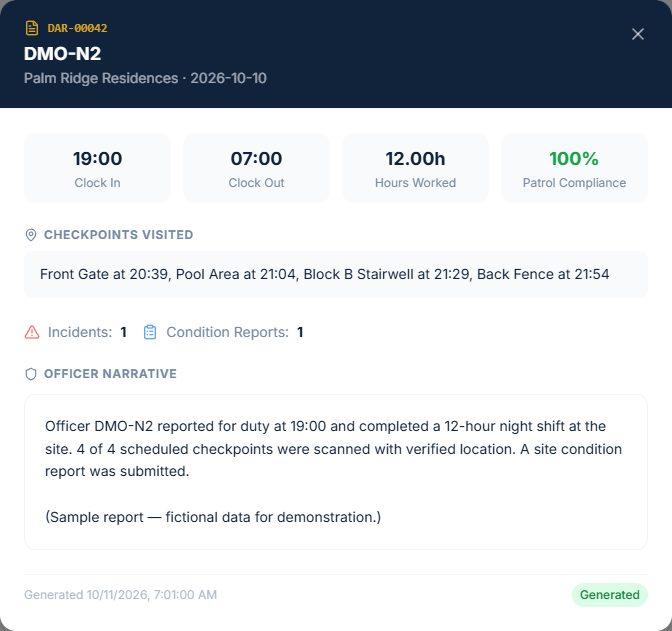
A sample daily activity report
Open any report to see clock-in and clock-out times, the checkpoints visited and when, reports filed, and a written summary of the shift.
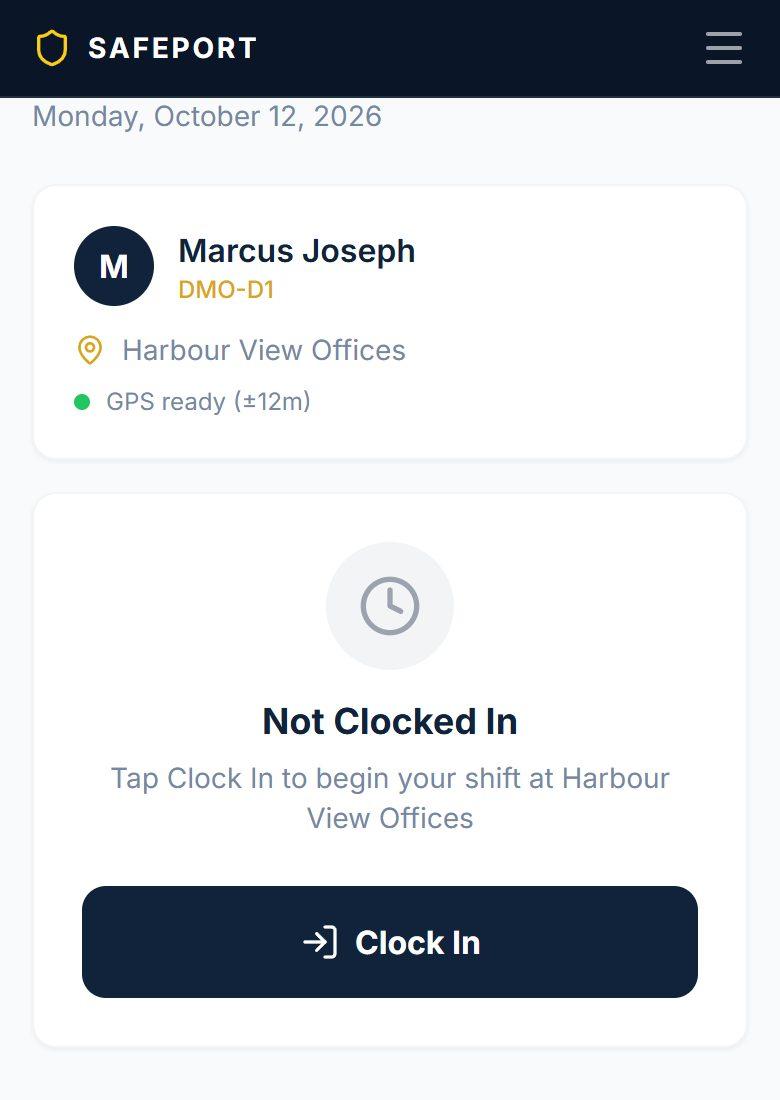
Clock in at the site
The guard sees their site and confirms their location is ready before clocking in from their own phone.
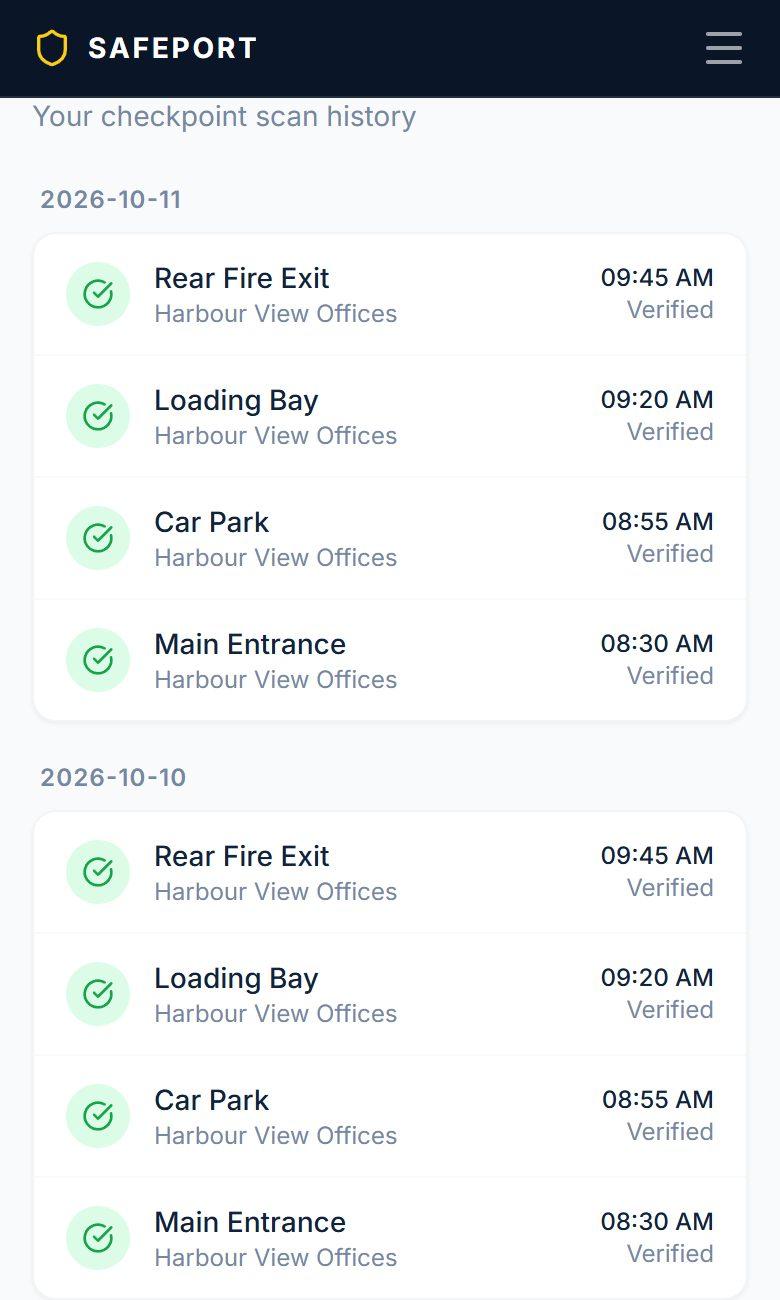
Patrol log
Each checkpoint scan is listed with its time and whether the location was verified.
What your company needs
A smartphone per guard on duty
Android or iPhone with location and camera. The guard app installs from the browser — no app store needed.
Mobile data or WiFi
The app needs a connection to clock in, scan or report. It does not store records offline to send later.
Printed checkpoint codes
QR codes are generated in the system for you to print and post at each checkpoint.
A web browser for managers
Managers and supervisors use the system from any computer or phone browser.
Getting started
- Request a demonstration to see the manager and guard views working together.
- We discuss your number of guards and sites, and how your operation runs today.
- Setup, training and support arrangements are agreed with you before you start.
- Pricing is quoted for your company’s size — ask us for a quotation at any time.
See it with your own operation in mind
Tell us a little about your company and we will arrange a demonstration of the Guard Management System.
Request a System DemoRequest System PricingSystem access or security services?
Guard Management System
You run your own guards, sites and clients. Safeport provides access to the system.
Request a System DemoGuard Outsourcing
Safeport supplies and manages trained officers for your premises.
About Guard OutsourcingSafeGuard Integrity
Safeport independently verifies that security at your property is actually being performed. Powered by our Guard Management System.
About SafeGuard IntegrityInGuard Programme
Safeport trains and monitors one of your existing staff as an in-house security officer.
About InGuardSystem access FAQs
Can we use the system with our own guards?
Yes. The system is for your own guards, your own client sites and your own daily operations.
Do we need to buy Safeport guarding services?
No. Access to the Guard Management System is a separate offer. You do not need to hire Safeport guards to use it.
Who manages our daily operations?
You do. Your managers and supervisors run your guards and sites in the system. Safeport provides the system, not the day-to-day management of your team.
What can our clients access?
Client logins are not part of system access at present. Your own team holds the records and decides what to share with your clients.
Is it an app from the app store?
No. Guards install the app on their phones directly from the browser, on both Android and iPhone. It opens full-screen with its own icon.
Does it work without a connection?
No. A mobile data or WiFi connection is needed to clock in, scan checkpoints or file reports, so every record is time-stamped when it happens.
How do setup and pricing work?
Request a demonstration and we will walk you through the system, then discuss setup, training and pricing for your company’s size.
See the Guard Management System in action
Request a demonstration and we will show you how your managers, supervisors and guards would use it.
Request a System Demo